
Bring STL Scan Data Into SOLIDWORKS — Instantly.
We’re excited to offer a Free Limited Trial of ScanViz – the powerful add-in from Origin International Inc. that lets you import, overlay, and analyze 3D scan (STL) data directly inside SOLIDWORKS. No separate metrology software, no complex workflows. ScanViz is built for engineers, quality teams, and tooling professionals who need faster insight and higher accuracy without disrupting their daily workflow.
What ScanViz does for you
-
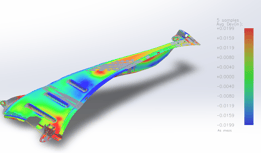
Instantly visualize scan data over your CAD model — see deviations in seconds.
-
Best-fit alignment and colour-map overlay make it easy to spot
 tolerance breaches and form/fit issues.
 -
Reduce inspection time from hours to minutes.
-
Work entirely inside SOLIDWORKS — no extra licences, no steep learning curve.
-
Import single scans or multi-batch data; access key metrics like Avg, Pp, Ppk, Cp, Cpk, and Six Sigma insights.
✔️ What you need to use ScanViz (Important)
To run ScanViz, you must have:
-
SOLIDWORKS CAD installed
PLUS -
A scanner that produces STL files,
OR -
STL scan files sent to you by customers or suppliers,
OR -
PCM/ScanViz result files shared with you from any partner already using CheckMate PCM or ScanViz.
Note:
SOLIDWORKS alone is not enough — ScanViz requires STL scan data (captured or received) to perform its analysis.
SOLIDWORKS alone is not enough — ScanViz requires STL scan data (captured or received) to perform its analysis.
If STL files are part of your workflow in any way — captured or provided, and you have SOLIDWORKS — ScanViz is an ideal fit.
Who benefits
-
Design Engineers – Validate prototypes by comparing physical scans to CAD.
-
Quality Engineers – Perform go/no-go analysis without switching platforms.
-
Process & Tooling Engineers – Identify tooling wear, batch drift, or early-stage deviation.
-
Your customers who also use SOLIDWORKS –
They can download the free trial too, and open any ScanViz or CheckMate PCM files you send them, enabling collaborative review and faster turnaround.
Why now
With increasing pressure to reduce scrap, accelerate time-to-market, and make inspection smarter, ScanViz gives your team an immediate advantage. The free, limited trial is the perfect time to test it in your workflow, evaluate its impact, and see how it fits your production environment.
What to do next
-
Download and install the ScanViz add-in for SOLIDWORKS.
-
Import your STL scan data and overlay it on your CAD model — take a few minutes to explore.
-
Test it on real-world parts, review deviation colour maps, and watch your workflow time drop.
-
If you see the value (and most teams do), we’ll follow up to help you explore licensing options.
Offer details
-
Free trial valid for 30 days
-
Full ScanViz support included during the trial
-
Designed for SOLIDWORKS users; ideal for inspection and deviation-analysis workflows
-
After the trial, a full license is available for $250 USD
Don’t let scan-to-CAD comparisons continue to slow your team down. With ScanViz, you stay inside SOLIDWORKS, reduce inspection time, enhance clarity, and unlock valuable insight you didn’t have before.